See what your baby's sleep log actually means
You've logged every nap and feed. Now get the answer on one screen: how long your baby stays awake between sleeps, how this week compares to last, and how the nights are going.
Get it for $9 (pre-sale)One-time payment. No subscription. No account.
- Plain English, not charts to decode."Awake stretches averaged 2h 42m this week, vs 2h 30m the week before." That is the kind of sentence you get.
- Private by design.It runs in your own browser. Your file is never uploaded and nothing is sent anywhere.
- Ready for the pediatrician.A short summary of the last two weeks you can show at the appointment.
What you get
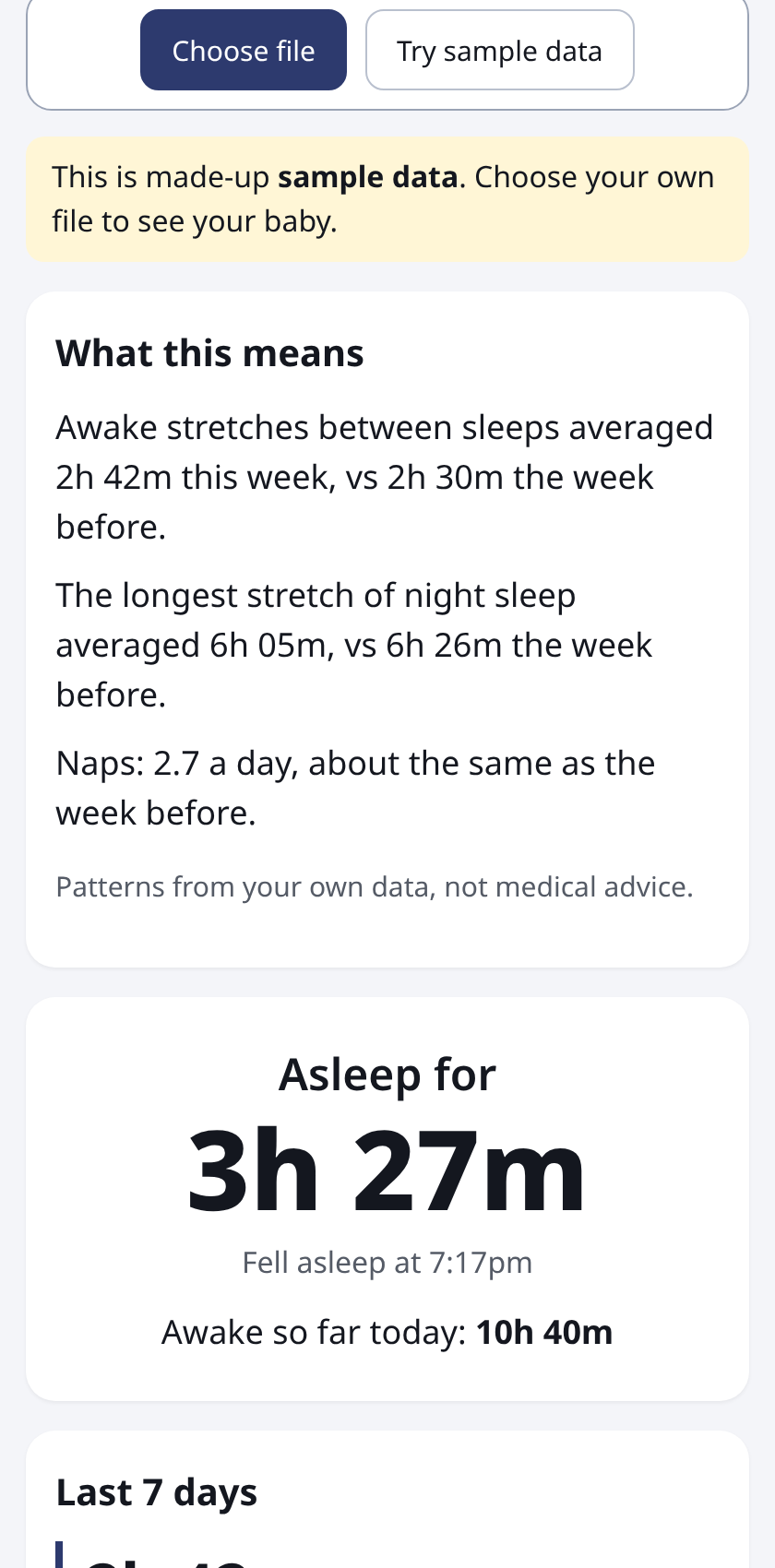
Made-up sample data. Your own numbers appear when you choose your file.
How it works
- Pay $9 once.
- Download the file straight after paying. We also email you a copy.
- Export your log from your baby tracker, open WakeGlance, choose the CSV. Done in seconds.
$9
One-time pre-sale price. It may go up after launch.
Get WakeGlanceIf it doesn't work with your export, reply to your receipt email and I'll refund you.
Your sleep log already has the answers
If you track your baby's sleep in an app, you have probably asked the same questions most tired parents ask. How long is my baby actually awake between naps? Are the nights getting better or worse? Was this week different from last week, or does it just feel that way? The answers are sitting in your log. The trouble is getting them out.
Tracking apps are built for logging quickly at 3am, and they are good at it. They are less good at turning weeks of entries into a few plain sentences. WakeGlance does that one job. You give it the CSV export of your log, and it gives you one screen in plain English. Below is everything it looks at and how it works it out, so you can also do it yourself if you'd rather.
What's in a Huckleberry CSV export, and how to get one
A CSV file is a plain-text spreadsheet: one row per entry and one column per detail. Huckleberry's help center says the export contains everything you logged for that child, including sleep, feeds and diapers.
How to export it
Huckleberry's help article "Can I export my data from the app?" gives these steps:
- Tap your child's profile icon in the menu bar.
- Scroll down and tap Export tracking data as CSV.
- Tap Got it! Email it.
- Open the email sent to the address on your account and download the file. The link lasts 24 hours, and you can ask for a new one after that.
Each child has a separate export. App menus change, so if a step looks different on your phone, follow what the app shows. There's more detail in the Huckleberry CSV export guide.
What the columns mean
The file WakeGlance reads has a header row with these columns: Type, Start, End, Duration, Start Condition, Start Location, End Condition and Notes. Type says what the row is, such as Sleep, Feed or Diaper. Start and End are dates and times like 2026-11-02 13:05, with no time zone attached. Duration is written as hours and minutes, like 01:15. The condition and location columns mean different things depending on the Type, which is why adding up a whole column in a spreadsheet gives odd results. Filter by Type first.
What wake windows are
A wake window is the stretch of time your baby is awake between one sleep and the next: from the moment a nap or the night ends until the next sleep starts. Parents talk about them a lot because they shape the day. If you know your baby has usually been awake about two and a half hours between sleeps lately, you can plan a walk, a feed or a car trip around that.
Wake windows change as babies grow, and they vary from baby to baby and day to day. Charts of "typical" wake windows by age differ between sources, so WakeGlance doesn't tell you what yours should be. It shows what your own log says has actually been happening. If you want to know what's typical for your baby's age, ask your pediatrician.
How to work out average awake time between sleeps
The idea is simple: list the sleeps in order, measure each gap between the end of one sleep and the start of the next, then average the gaps. Here is one made-up day.
| Sleep | Logged | Awake before it |
|---|---|---|
| Night ends | until 6:40am | - |
| Nap 1 | 9:00 to 10:15am | 6:40 to 9:00 = 2h 20m |
| Nap 2 | 12:45 to 2:00pm | 10:15 to 12:45 = 2h 30m |
| Nap 3 | 4:30 to 5:05pm | 2:00 to 4:30 = 2h 30m |
| Bedtime | from 7:20pm | 5:05 to 7:20 = 2h 15m |
Add the four awake stretches: 140 + 150 + 150 + 135 = 575 minutes. Divide by 4 and you get about 144 minutes, or 2h 24m on average for that day. For a week, do the same with every awake stretch from all seven days.
If your baby woke at 11:30pm for twenty minutes and went back down, that isn't a wake window in the usual sense. It's a night waking. Counting it would drag the average down and make it meaningless, so leave it out.
Why it gets messy by hand
- Naps and night sleep look the same. Every sleep is just a Sleep row. WakeGlance counts a sleep as night if it starts between 6pm and 6am or lasts 4 hours or more, and you can change those settings.
- Night wakings need skipping. Gaps between two parts of the same night aren't counted as awake stretches.
- Logs have gaps. If someone forgot to log a nap, you get a fake ten-hour wake window. WakeGlance skips gaps longer than 10 hours rather than letting them skew the average.
- Small logging slips. Sleeps that overlap or touch are joined into one, duplicate rows are spotted, and a sleep that's still going is handled.
The average wake windows guide walks through this in more detail, including how to do it in a spreadsheet.
This week vs last week
A single bad day says very little. A week is a better unit, and comparing it with the week before shows whether something is actually changing. WakeGlance takes your last seven complete days and the seven before them, leaving out today because it isn't finished. For each week it shows three numbers side by side: average awake time between sleeps, naps per day, and the average longest stretch of night sleep.
It needs at least three complete days in a week before it compares anything. If a week included teething, an illness, travel or a vaccine, you can flag those days and they are left out of the averages, so one rough patch doesn't hide the usual pattern.
Nights: the longest stretch and total awake time
For nights, the number many parents care about most is the longest unbroken stretch of sleep. WakeGlance finds the longest single night sleep for each night and averages it across the week, so you can see whether the long stretch is growing, shrinking or holding steady. A night is counted from the evening it starts, so a sleep that begins at 7pm and runs past midnight stays with the night it belongs to.
It also adds up total time awake for each full day, midnight to midnight, and shows the last 14 days as simple bars. That makes it easy to spot a day that stands out, like a day out or a skipped nap, and to see whether a long day was followed by a rougher night.
What to bring to the pediatrician
Appointments are short, and "she's not sleeping well" is hard to act on. A few numbers from your own log make the conversation easier. WakeGlance has a one-page summary of the last 14 days that you can print or save as a PDF. It shows, per day on average:
- time awake and time asleep, split into night sleep and nap sleep
- naps per day and average awake time between sleeps
- the longest night stretch, on average and at most
- feeds per day, bottle volume if you log it in ml, and wet and dirty diapers
It also shows the dates covered and how many flagged days were left out. Bring your own questions too, written down before you go. The pediatrician summary guide has a simple checklist. WakeGlance only describes what was logged. It doesn't diagnose anything or tell you what's normal, and it isn't medical advice.
Private: it runs in your browser
Your baby's log is personal, so WakeGlance is a single file that works entirely on your phone or computer. When you choose your CSV, it's read inside your browser. Nothing is uploaded, there's no server and no account, and it doesn't send your data anywhere. The only thing it saves is any days you flag, kept in your own browser so they're there next time. You can try it with the built-in made-up sample data before choosing your own file.
Who it's for
WakeGlance is for parents who already log sleep in Huckleberry and want clear answers without building a spreadsheet. It's not a tracker, and it doesn't replace your app. Keep logging as you do now, and export whenever you want a fresh look. If you don't use Huckleberry, it won't read your file yet.
$9
One-time pre-sale price. No subscription.
Get WakeGlanceDownload straight after paying. If it doesn't work with your export, reply to your receipt email and I'll refund you.
Guides
- How to export your Huckleberry data as a CSV, and what's in it
- How to work out your baby's average wake windows
- A baby sleep summary for your pediatrician
Questions
Which apps does it work with?
Right now it works with the CSV export from Huckleberry. Other trackers may come later.
Is my baby's data safe?
Your file is read inside your own browser and never leaves your device. There is no server, no account and no tracking of your data.
Does it work on my phone?
Yes. It's built for a phone screen, and also works on a laptop.
How do I get the file after paying?
After checkout you go straight to a download page for your purchase. We also email you a copy. If anything goes wrong, reply to your receipt email.
How do I calculate average wake windows?
Measure each gap from the end of one sleep to the start of the next, leave out wakings in the middle of the night, then average the gaps. WakeGlance does this for every day in your log.
How does it tell naps from night sleep?
By default a sleep counts as night if it starts between 6pm and 6am or lasts 4 hours or more. You can change those settings.
Does it need an internet connection or an account?
No account. Once you have the file, it works in your browser without sending anything anywhere.
Why a pre-sale?
I'm checking that this is useful before building more. Early buyers get the current version, and I'd love to hear what you'd change.
Does it give medical advice?
No. It only shows patterns in what you logged. Talk to your pediatrician about any concerns.